settingsUser Settings & Preferences

Personalize Your Courier Management Experience

Dashboard customization that tailors the courier software to your workflow, role, and daily preferences.

  • checkDashboard customization down to widget level
  • checkLayouts and shortcuts matched to your role
  • checkPreferences sync across devices in real time
  • checkProfile settings for security and tracking controls
0+Customizable Preferences
Real-TimeCross-Device Sync
0%Profile Portability
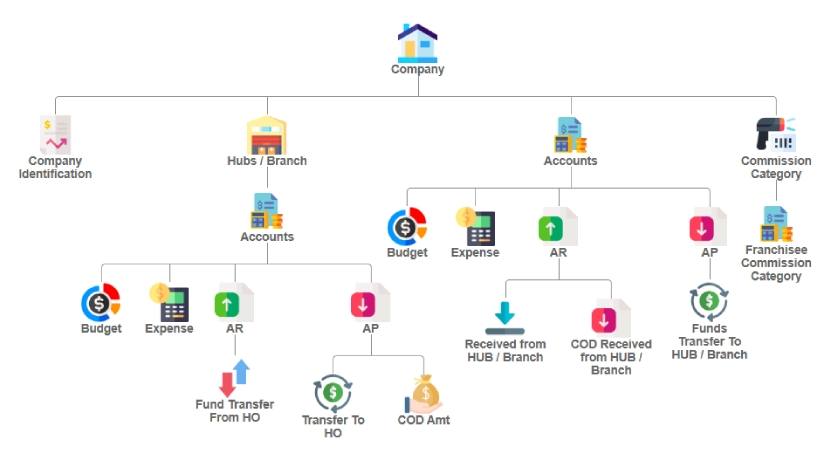
User Settings Dashboard showing module flowcharts and dashboard customization
User Settings Benefits

Personalize Your Courier Software Preferences

  • check_circleFavorite screens management to bookmark and quick-access frequently used pages
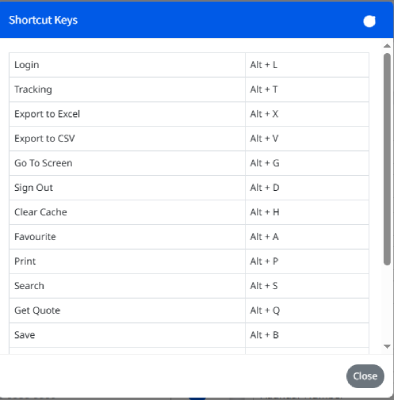
  • check_circleCustom keyboard shortcuts for the actions you repeat most
  • check_circleNotification settings you control by channel, not blanket on/off
  • check_circleSecure password update and geo-location tracking controls
  • check_circleInteractive module flowchart visualizing system workflows and relationships
  • check_circleComplete dashboard customization for personalized logistics software personalization

User Preferences That Fit Daily Courier Work

Dashboard customization, favorite screens, keyboard shortcuts, and notification controls, each tuned to how the person using it works.

space_dashboard

Dashboard Customization

Dashboard customization tools adjust the platform layout, widgets, and data visualization to how each person actually works.

bookmark

Favorite Screens

Favorite screens management puts tracking, reports, or customer management one click away instead of three menus deep.

keyboard

Keyboard Shortcuts

Create keyboard shortcuts for the actions you repeat most, and navigate without reaching for the mouse.

notifications

Notification Settings

Notification settings are controlled channel by channel: email, SMS, and push, so alerts reach you the way you want.

security

Profile & Security

Handle password updates and geo-location tracking preferences from user profile settings, all in one place.

account_tree

Module Flowcharts

An interactive module flowchart maps system workflows and how modules relate, a handy overview of logistics software personalization options.

Set Up Your Workspace Around Your Most-Used Pages

Favorite screens management is where logistics software personalization starts: the pages you open hourly sit one click away.

  • check_circleBookmark frequently used pages like tracking, reports, or customer management with a single click
  • check_circlePreferences travel with you: keyboard shortcuts and notification settings sync across devices
  • check_circleAdd or remove favorites from user profile settings or the quick-access dropdown
  • check_circlePlays alongside geo-location tracking presets and password update security controls
  • check_circleEvery preference shows up in the module flowchart overview, nothing hidden
Favorite Screens Management showing bookmarking and quick-access pages
Custom Keyboard Shortcuts for logistics software workflow optimization

Boost Productivity with Custom Keyboard Shortcuts

Tailored keyboard shortcuts cut navigation time in courier software, part of the broader courier software preferences set.

  • check_circleCross-Feature Support: Works with favorites, dashboards, and flowcharts
  • check_circleWorkflow optimization: map shortcuts to your most-used actions
  • check_circleProfile sync: shortcuts saved to your cloud-based preferences
  • check_circleAccessibility: usable for power users and beginners alike

Make the software work the way you do

Dashboard customization, favorite screens, and keyboard shortcuts all adjust to the person using them, in CMS Elite.