Role-Based Access Control (RBAC)
Create roles like Admin, IT Staff, Maintenance, or Branch Manager and assign specific screen access to each role.
Role-based access control that protects sensitive asset operations by limiting access to relevant screens.
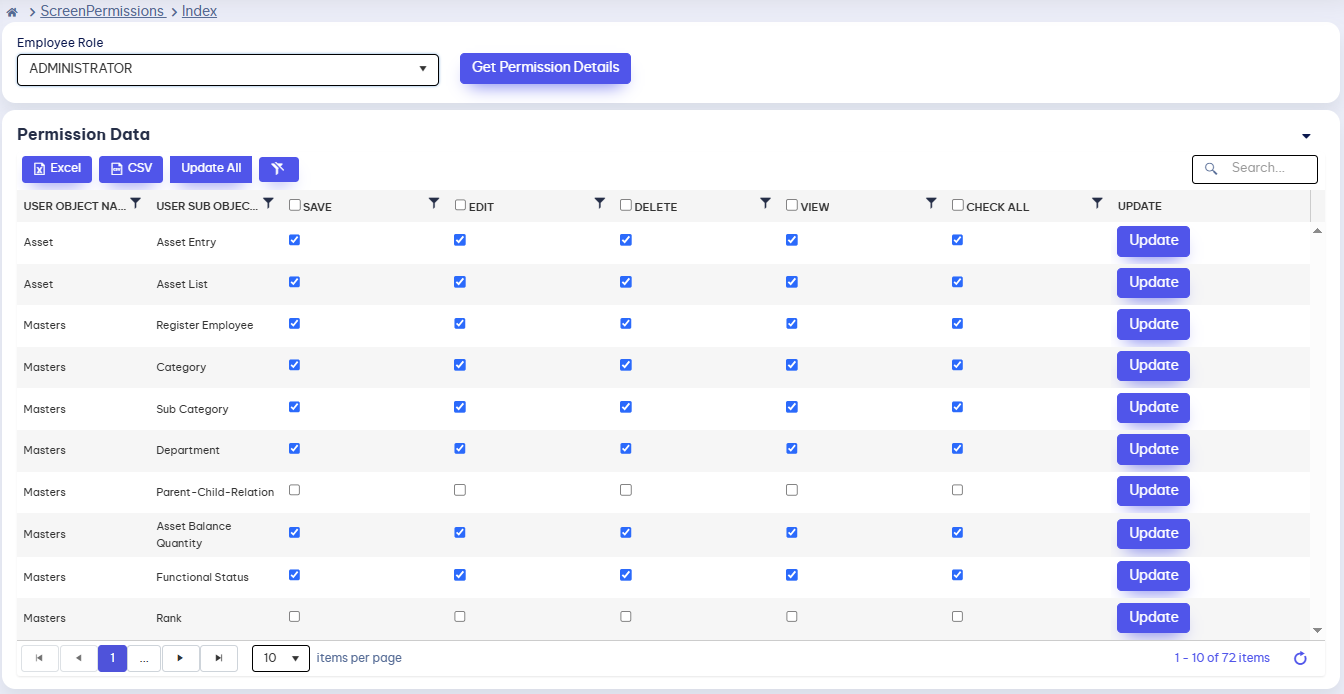

Role-based permissions decide who can open each module. Screens can be switched on or off, and access grows with your organization.
Create roles like Admin, IT Staff, Maintenance, or Branch Manager and assign specific screen access to each role.
Switch access to any module or screen, such as Branch to Branch or Repair Management, on or off for selected users or roles.
Separate data and functions cleanly across departments and branches, no matter how large the organization gets.
Role-based access control that keeps sensitive operations protected at every size of organization.
RBAC ensures users only see what is relevant to their role.
Always-on permission enforcement for every screen.
Hiding irrelevant screens reduces confusion and mistakes.
Manage permissions across departments and branches as you grow.
Boost accuracy, visibility, and efficiency across your organization. Track, transfer, and manage with speed — start optimizing today!